How to detect a page request from Safari 4’s Top Sites feature

While reading Jeremy Keith’s blog entry “Safari Askew” I remembered that I had looked at this just before Christmas, and found an answer.

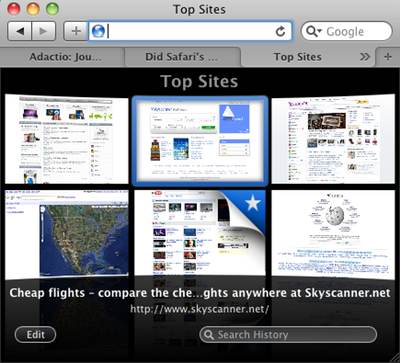
The problem is to do with Safari 4’s “Top Sites” feature, which shows you a pretty grid of thumbnails for the sites you visit most regularly (or that you have pinned in place). The interesting thing is that these thumbnails are live (ish) previews of what those pages currently look like. If you don’t happen to have a Top Sites page open in a tab, and if Safari considers that the current thumbnail is sufficiently out of date, it will automatically go and retrieve the latest version.

Safari 4's Top Sites feature

This can cause headaches for site owners, because in order to show the actual state of the page, Safari relies on full page requests: it downloads all the HTML, CSS, images, and JavaScript for the page, and then displays everything exactly as if the user were viewing the page in a standard tab. Adverts are rendered, page tracking scripts are executed, and to the server it looks just like a regular page hit. This can lead to the site recording unnecessary actions, and your site analytics being all messed up.

At Skyscanner, for example, we noticed this because Google Analytics was showing an unusually high number of Safari users (8.5%) with an abnormally high bounce rate (the proportion of sessions where users view a single page, then walk away with no further interaction): Safari 4 users were twice as likely to bounce as other browsers. Useless sessions generated by Top Sites were the problem.

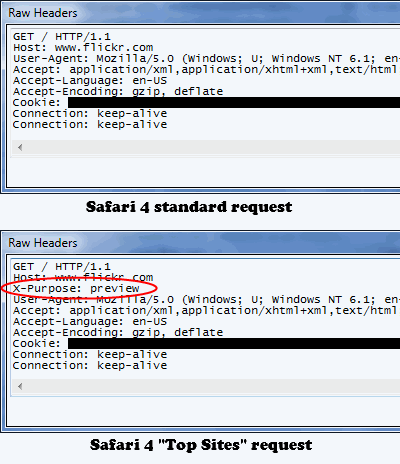
As Jeremy noted, the user agent that Safari 4 reports for a Top Sites request is exactly the same as for a normal page request. Fortunately, there is a way to distinguish the two types of request: in the current version of Safari 4 (4.0.4) the Top Sites request for the base page (but not its JS/CSS/image resources) carries an additional HTTP header, namely “X-Purpose: preview“.

An easy way to verify this is to use an HTTP debugging proxy like Fiddler or Charles to watch what happens when Top Sites makes a request — see the screen grabs below:

Normal and Top Sites HTTP requests from Safari 4

If your pages are dynamically generated, you can adjust your server-side code to examine the HTTP headers of the incoming request, and take appropriate action if this is a “preview” request. Here’s some sample PHP code:

<?php
if ($_SERVER["HTTP_X_PURPOSE"] == "preview") {
	echo "preview";
} else {
	echo "normal";
}
?>

("X-Purpose" is not a standard HTTP header, and you won’t find “HTTP_X_PURPOSE” in the PHP documentation. It’s the CGI specification that specifies how HTTP headers should be handled: they should be made into an environment variable with an “HTTP_” prefix followed by the header name, with dashes replaced by underscores. Hence, the value of the "X-Purpose" header is placed in the "HTTP_X_PURPOSE" environment variable, and retrieved as $_SERVER["HTTP_X_PURPOSE"].)

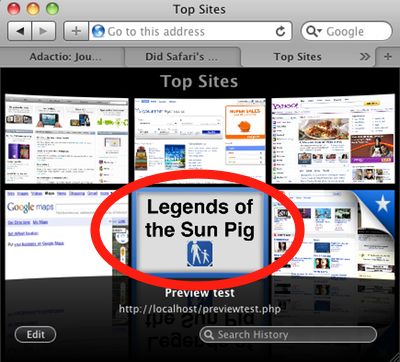
If all you’re looking to do it fix your site stats in Google Analytics, then you should just make sure that you don’t write out the GA tracking code for preview requests. If you are concerned about excessive load on your servers, unwanted user actions, or spurious advert impressions, you can take more aggressive action, perhaps by rendering a lightweight version of the page. An extreme possibility I considered was generating a completely different version of the page, specifically designed to look good in the thumbnail format of the Top Sites preview page:

Safari 4 Top Sites with custom preview thumbnail: PROBABLY A BAD IDEA

However, doing this runs counter to the notion that these thumbnails represent previews, and I don’t know how your users would react. More importantly, Google might consider this cloaking, and come round your house in the middle of the night with a baseball bat. Just because it’s possible, doesn’t mean it’s a good idea…

2009 in review: books

2009 was the year of the re-read for me, and in particular the series re-read. I love diving into a series and living in the same world as the characters for weeks on end. At the start of the year I couldn’t find any new series I wanted to start on, so I went back to some old favourites:

  • Roger Zelazny’s Amber series
  • Neil Gaiman’s Sandman books
  • Lois MacMaster Bujold’s Vorkosigan series
  • Julian May’s Pliocene and Galactic Milieu series

I have read the first three series several times before already, and they are always fresh, and always fun. For a change, I read the Vorkosigan books in chronological order (although I started with Shards of Honor, rather than Falling Free), and in rapid succession. The early Miles books (The Warrior’s Apprentice and The Vor Game are still my favourites, and it turns out that Diplomatic Immunity isn’t as bad as I remembered it.

The Julian May books were less of a pleasure. If it weren’t for the “I’ve got this far so might as well keep going” sunk-costs argument, I would (should) have stopped about fifty pages into The Golden Torc. I remember waiting eagerly for the publication of Diamond Mask and Magnificat in the mid-90s, but now I just find the characters overly self-absorbed and melodramatic; I don’t think I’ll be re-reading them again.

Lois McMaster Bujold - The Sharing Knife, volume one: Beguilement
Lois McMaster Bujold - The Sharing Knife, volume two: Legacy

Staying with Lois McMaster Bujold, 2009 saw the publication of the fourth and final book in her Sharing Knife series. I bought the first book, Beguilement when it was released in 2006, but didn’t read it at the time. I knew it was only the first part of a single big story, and having been burned by Peter F. Hamilton’s Pandora’s Star the previous year, I didn’t want to start on the tale, only to have to wait three years to get to its end. But when the fourth part, Horizon was published in February, I grabbed it and started from the beginning.

Lois McMaster Bujold - The Sharing Knife, volume three: Passage

The Sharing Knife is a fantasy romance — not a combination that normally leaps off the shelves at me. But I trust Bujold to write characters I care about and a story that interests me regardless of my genre prejudices, and that is exactly what she has done here. The world she has created has more of an American frontier feel to it rather than a pseudo-medieval European vibe: prairies and riverside trading towns rather than dark forests and castles. Lakewalkers patrol the land on the lookout for malices, creatures that rise from the earth and feed on the life energy of everything nearby, and are capable of devastating entire towns. The malices are an ancient menace, but thanks to Lakewalker efforts over the centuries, a rare one now. So rare that many farmers don’t even believe in them any more, which causes tension when Lakewalkers come to town and require their aid. Because of the apparent safety, and the particular magical means by which Lakewalkers fight the malices, farmers have grown likely to fear and mistrust them, and call them witches, rather than heed their warnings.

Lois McMaster Bujold - The Sharing Knife, volume four: Horizon

The main characters are Fawn, a young farmer woman who has run away from home, and Dag, a grizzled Lakewalker veteran. They fall in love despite the large cultural gap that separates them. The books follow them as, outcast from their families and communities, they try find a place for themselves in the world, and to somehow reconcile these two parallel but highly interdependent societies.

Oh, and fight evil! The book covers may look all sweet and pastoral, but the plot is driven forward by the ongoing and very real threat of the malices. While I wouldn’t characterize the books as adventure stories, there is no lack of action. Bujold strikes a masterful balance between the clash-of-cultures love story and edge-of-your-seat thrills, and I can highly recommend the whole series.

(Just make sure you read the first two books, Beguilement and Legacy together, because it is really one book split in two — even the covers are two halves of a single piece. Three and four make up “part two”, but they are a looser pairing.)

Steven Brust - Jhereg

Throughout November and December I also caught up on Steven Brust’s Vlad Taltos series (including an advance copy of Iorich thanks to Patrick at Tor). I know that I had read Jhereg before, and I’m pretty sure that parts of Yendi were familiar; what I can’t figure out is why the hell I would have read the first two books, but not gone on to devour the rest of the series, because it’s awesome. They are (for the most part) hard-boiled fantasy detective novels, not dissimilar in tone to some of my favourite contemporary detective series (Spenser, Elvis Cole, Myron Bolitar, et al.) The “detective” may be a witchcraft-using assassin, and his sidekick a miniature dragon (jhereg) on his shoulder, but the mean streets of the city are still mean, and when tough talk fails, knocking a few heads together often shakes loose the information required.

That only really describes the surface appearance of this series, though; the underlying world is rich and complex, full of Gods, Great Weapons, ancient sorcery, discrimination, social unrest, and peasant revolutions. Another thing that appeals to me about the books is that they are short, in the 200–300 page range. Steven Brust says what he wants to say, and then moves on. I like that. (Unfortunately his writing style in the other Dragaeran books has the opposite effect on me. I haven’t been able to get past the first few pages of The Phoenix Guards.)

Joe Navarro - What Every Body Is Saying

Finally, some non-fiction. I have been interested in non-verbal communication since I picked up a copy of Allan Pease’s Body Language in the mid-eighties. In fact, this is one of the reasons I dislike working remotely. Phone calls strip out all the visual cues I use to pick up on the mood of the office, and to gauge unvoiced concerns in a meeting.

Joe Navarro is a former FBI agent with a background in interrogation and deception detection, and What Every Body Is Saying pays a lot of attention to reading the signals people emit during conversation. Navarro emphasizes that this is not about being able to tell whether someone is lying or telling the truth (although that does make for good TV), but rather about learning whether someone is confident or holding back, relaxed or stressed. When you understand that, you can try to guide the conversation to figure out why they are feeling that way.

Interestingly, this has significant use in usability testing. One of the tenets of usability testing is that you pay attention to what people do, rather than what they say. People are often reluctant to criticize, preferring instead to tell white lies about things they dislike. By studying their posture, gestures, and expressions during a test, and in post-test conversations, you can gain a much better understanding of their emotional state, and where problems lie.

This is definitely one of my top picks of the year. It’s very clearly written, and sprinkled with good illustrations, and not only does it make an excellent introduction to the subject of non-verbal testing, but it also rewards repeated reading and bite-sized dippings-into. Very excellent.

One of the most important things I read in 2009

Dean Allen commenting over on Zeldman’s site during the discussion of why he shut down Favrd:

No fit of pique for me, actually. More like a gradual aha, with a slight wince and sigh at the end. I’ve spent the past year or so reading and writing and doing my level best to chip away at 40 years of belief in the logical fallacy that one’s identity meaning – self-worth, self-image, whatever you want to call it – can accurately be measured in the thoughts of others. Much as you and I may enjoy being encouraged through recognition and praise and dislike being saddened by rejection or indifference (god knows we’re taught to right from the outset by caregivers: good boy, pretty picture, heckuva job Brownie), deriving personal value from these transactions in the absence of a well-formed internal frame of reference through which you can decide on your own what does and doesn’t work, and subsequently accept the opinions of others as feedback, is just plain faulty thinking, of the sort that makes otherwise capable, centred people all loopy and weird.

I never used Favrd; I haven’t spent a lot of time thinking about the rights and wrongs of shutting it down so abruptly. What I have spent a lot of time thinking about is my own sense of self and self-worth. I intend to spend more time on this in 2010.

To blog or to tweet?

Yesterday Anil Dash wrote a great piece about being on Twitter’s “Suggested User List.” I tweeted it this morning, as did many other people. This afternoon Anil tweeted:

Thanks to all who retweeted my piece about Twitter’s suggested list. (I miss the days when people responded with their own blog posts, tho.)

Yeah, I miss those days too. Twitter (which I will use as shorthand for any short messaging service) makes it very easy to post a quick thought, a status update, or a link to something interesting. Much of blogging used to be like that, but the blog postings used to be longer, with more context. I rarely posted one-line blog entries or simple links, because I felt that a blog entry should have some kind of story — a thread, a narrative — to guide the reader to a particular conclusion or insight. This classical “essay” model of blogging has problems, though:

  • If you are locked into the classical mode, a sense of obligation to write a more elaborate piece can prevent you from writing anything.
  • Not all thoughts, insights, and amusing moments you want to share with your friends (and the rest of the world) warrant more than a brief sentence or two. Explaining an aphorism can ruin the joke.
  • And sometimes all you want to do is point to a link, or stick up a photo. In first-generation blogging tools the overhead of creating an “entry” could be more effort than the mini-message was worth.

Over the last year, I have heard many people say that they blog much less now that Twitter is around. By providing an outlet for people to express themselves quickly and efficiently (albeit in 140-character chunks), it bleeds off a certain amount of creative pressure that would otherwise have led to more and longer blog postings.

I don’t want to make this a lament on the “death of blogging”, because blogging emphatically isn’t dead; otherwise, where would we all find the cool links to tweet about? In fact, good blog articles benefit from Twitter, because it provides a fast and social notification medium in parallel to the existing mechanisms of RSS feeds and reblogging.

Furthermore, “The Tweet” is as much a new form of writing as blogging was, with its own grammar and conventions. In his article “How the Web and the Weblog have changed Writing“, Philip Greenspun talks about how blogs have given a natural home to ideas that don’t need to be padded out to a whole book or a full-length magazine article; Twitter is just the next logical step.

The web has given us an unprecedented range of tools with which to express ourselves. It is up to us to learn to use these tools, and to understand when it is appropriate to use each one.

JavaScript: Rule 1

JavaScript development (for the web) is big right now, and in 2010 it’s only going to get bigger. There is a lot of information available on good practices for web application development with JavaScript, but if performance and maintainability matter to you, few things* are more important than Rule 1:

Source code is for humans, live code is for machines.

I first heard Christian Heilmann state this rule at @Media Ajax 2007 as “production code is for humans, live code is for machines” but I prefer the term “source code” to “production code”. The rule was important and prescient then; now I consider it the absolute foundation of any significant web application.

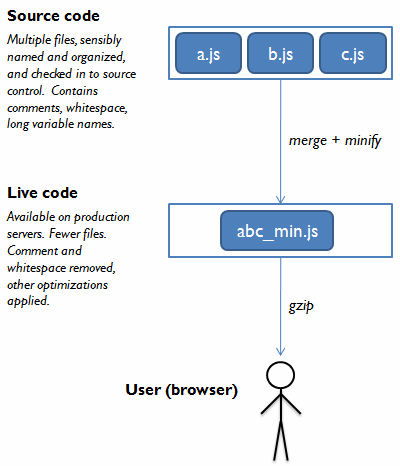
Development code is transformed into live code before being sent to the browser.

Rule 1 comes into play as soon as you have a project that involves any of the following:

  • More than a couple of hundred lines of JavaScript source code.
  • More than a couple of JavaScript source code files.
  • More than one developer.

In olden days (say, 2006), the JavaScript code for many web applications consisted of a single file. Comments were few and far between, and variable names were kept short because we wanted the code to be as small as possible. But this strategy does not scale. As projects get more complex, a single file filled with non-descriprive functions and one-letter variable names quickly becomes unreadable. In modern web application development there are two weapons we can use to tackle this problem: concatenation and minification.

Concatenation is the process of taking multiple JavaScript files, and combining them into a single file. Minification is the process of transforming a JavaScript source file to make it smaller. Early JavaScript minifiers just removed comments and unnecessary whitespace, but modern minifiers (YUI compressor, Dojo Shrinksafe, Google Closure Compiler) can also perform more aggresive optimizations, such as shortening variable names and removing unneeded code.

Basically, the JavaScript source code that developers write is no longer the JavaScript code that end users receive, and can see when they view the components for the page. The first benefit of this is performance: concatenating files reduces the number of HTTP requests web app requires, and minification reduces the download size (and can also reduce parsing time on the client). The second benefit comes in the form of better source code clarity, which is good for development and maintenance:

  • You can use multiple files to hold your source code, and organize them (naming convention, file hierarchy) however you want.
  • You can use lots of whitespace and comments throughout your source code.
  • You can use descriptive (long) variable and function names, because the minifier will try to reduce them to one-letter variables (identifier replacement).

A further consequence of this is that when you are writing JavaScript code, you now have to keep three audiences in mind:

  • The browser’s JavaScript interpreter. Your code MUST run in the target browser(s).
  • Humans. Your code SHOULD be clear and comprehensible to your colleagues.
  • The minifier (“compiler”). Your code SHOULD be structured to help your minifier apply its optimizations.

Personally, I am most familiar with the YUI compressor. If you choose to use it, then Nicholas Zakas’ slide deck on structuring your code for optimal optimization is required reading. In addition to helping the YUI compressor make your code even smaller, many of these tips make for tidier, more comprehensible code; and because they encourage the use of local instead of global variables, they can even make your code run faster too. Here are some of the main points:

  • Any literal value used two or more times should be stored in a local variable.
  • Any global variable used two or more times should be stored in a local variable.
  • Any property used two or more times should be stored in a local variable.
  • Try to use only one var keyword and one return statement per function.
  • Don’t use eval, with, or JScript conditional comments.

Where exactly you apply the concatenation and minification is up to you, and will depend on how your deployment pipeline is set up. You can do it as part of your build process, or you can do it at runtime — provided you have some form of caching enabled so that you don’t repeat the process for every request.

*Finally, I should note that the process of concatenation and minification is not the single most effective strategy in reducing the download size of your JavaScript components; that honour goes to gzipping, so I suppose that enabling gzip compression on your web application should, in the programming tradition of zero-based lists, be considered as “Rule 0”. But when it comes to maintaining a complex application, and delivering a compact download package, this is the way to go.

Movable Type drops support for Safari?

I’ve been an enthusiastic user and advocate of Movable Type since version 1 in 2001. I can’t remember any statement from Six Apart that has shocked me more than this one, made by Jun Kaneka on the MT support forum on 9th December:

Just to be clear, MT5 should work fine with Safari. Actually, the UI designer mainly uses Safari to develop MT5.

On the other hand, supported platform is defined by
the platform which QA team conducts their test. It is now

* Mozilla Firefox 3.5 or higher

* Internet Explorer 6.0 or higher

He slightly elaborates on this on the MTOS-dev mailing list, also on 9th December:

That’s the difference between “Supported” and “Should work fine”.
I’m sorry that the System Requirements page on MT.org
is not precise on that part. We will fix it.

The System Requirements page for MT was last updated on 10th December. The “Web Browser” section currently reads:

As Movable Type is a modern web application which uses Javascript and AJAX extensively, it requires a modern web browser. We strongly recommend the latest version of the following browsers. Browsers are free and easy to upgrade!

The Movable Type is tested and supported on the following browsers:

  • Mozilla Firefox 3.5 or higher
  • Internet Explorer 6.0 or higher (We STRONGLY recommend the latest version).

Movable Type should work fine with other modern browsers, but is not tested with these browsers:

  • Safari 3 or higher
  • Opera
  • Chrome
  • etc.

As a web developer, I completely understand the difference between “supported” and “should work”. Yahoo’s Graded Browser Support policy, with its definitions of A, C, and X-grade browsers codifies this concept neatly. With limited development and testing resources it is impossible to fully support every browser.

But for a company like Six Apart to restrict their list to IE6+ and Firefox 3.5+ is mind-boggling. First of all, there is a huge contradiction between the two platforms they do support: IE6 is eight years old, used by a small and rapidly declining percentage of users, and is widely known as the least capable browser platform still in common use today; Firefox 3.5 is one of the most advanced browsers currently available, but it was released a mere six months ago. Secondly: no Safari. Safari is the browser of choice for the vast majority of Mac users, and enjoys significant use on Windows, too.

The only thing I can think of when I look at that list is: enterprise. Movable Type has now completely abandoned its former user base of hobbyists, bloggers, and geeks, and wants to concentrate on selling into the corporate market. The vocal minority of people who will be pissed off by the absence of official Safari support &mdash the trendsetters, the evangelists, the plugin developers, the tutorial writers — are not the people 6A is interested in reaching any more. To be honest, most of them left for WordPress, Drupal, or ExpressionEngine a long time ago. For several years now, Movable Type has been lacking in product momentum, community, and cool factor, but damn it, it’s a great product with a fantastic feature set, and it’s an awesomely stable platform on which to build a site.

But if MT is abandoning me (I’m writing this in Chrome — not Safari, but part of the Webkit family), I don’t think I can continue to recommend it any more, and this makes me very sad.